Key Takeaways
- Most SEO fixes cost little to nothing. Claiming a Google Business Profile, fixing a meta description, or cleaning up a URL are free changes that often move the needle the most.
- Google Business Profile is the single most overlooked tool. It’s the fastest free way to show up in local search and map results, yet most small businesses leave it unclaimed or half-finished.
- Specific keywords beat broad ones. Chasing overly competitive terms like “candles” or “plumber” wastes effort; longer, specific phrases attract buyers who are ready to act.
- Technical basics quietly sink rankings. Slow load times, a non-mobile-friendly site, missing SSL, and inconsistent business info (NAP) across the web all hold a site back even when the content itself is good.
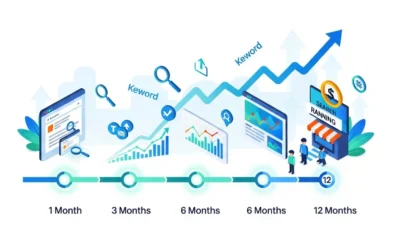
- SEO rewards consistency over perfection. Real results typically take 3 to 6 months, and fixing one thing at a time beats trying to overhaul everything at once.
Small businesses lose customers every day because of simple SEO mistakes. The good news is every single one of them is fixable.
You built your website. You wrote your pages. Maybe you even tried a blog post or two. And then you waited for the phone to ring.
It didn’t.
I have seen this happen hundreds of times in my 12 years of experience. Business owners who work incredibly hard but make a few simple SEO mistakes that quietly push them off Google’s radar.
You do not need a big budget. You do not need to be a tech expert. You just need to know what you are doing wrong and fix it.
This guide covers every major SEO mistake small businesses make in plain simple English. No jargon. No confusing tech talk. Just clear answers and real fixes you can use today.
Let’s get into it.
Here is what nobody tells you upfront:
You do not need a big budget to rank on Google. You do not need to be a tech expert. You just need to stop making the mistakes that are holding you back.
This guide breaks down every major SEO mistake small businesses make, in plain simple English. No jargon. No confusing tech talk. Just clear answers and real fixes you can start using today.
If you are a local plumber, a boutique owner, a solopreneur, or a marketing manager at a small company, this was written for you.
Let’s get into it.
What Is SEO and Why Does It Actually Matter for Small Businesses?
SEO stands for Search Engine Optimization.
In plain English? It means making your website easy for Google to find, understand, and show to the right people.
When someone types “best plumber near me” or “affordable wedding photographer in Denver” ,Google decides which websites show up first. SEO is how you get to be one of those websites.
Here’s why it matters so much for small businesses:
- 68% of all online experiences start with a search engine (BrightEdge)
- 75% of users never scroll past the first page of Google results
- Organic search traffic is free ,unlike paid ads that stop the moment you stop paying
- Local SEO can drive real foot traffic and phone calls to physical businesses
The problem? Most small business owners either ignore SEO completely or make critical mistakes that waste time and money.
Let’s break down every major mistake ,starting with the most damaging ones.
No. 1: Keyword Research Mistakes
Mistake 1: You’re Not Doing Any Keyword Research
This is the most common starting point for disaster.
Many business owners write website content based on what they think customers are searching for. But guessing doesn’t work. Google rewards relevance ,and relevance requires knowing the exact words your customers type.
The Fix:
- Use free tools like Google Keyword Planner or Ubersuggest
- Type your service into Google and look at the “People Also Ask” section
- Check what your competitors rank for using tools like Ahrefs or SEMrush
Start with 5-10 keywords that describe your business. Then build your content around those.
Mistake 2: Chasing Big Keywords You Can’t Win
If you sell handmade candles and you’re targeting the keyword “candles” ,you’re competing with Yankee Candle and Amazon. That’s a fight you won’t win.
Small businesses make the mistake of going after high-volume, super competitive keywords and wondering why they never rank.
The Fix:
Focus on long-tail keywords ,longer, more specific phrases with less competition and higher buying intent.
Examples:
- “candles” (too broad, too competitive)
- “lavender soy candles for anxiety” (specific, ready-to-buy audience)
- “plumber”
- “emergency water heater repair in Tampa FL”
Long-tail keywords convert better because the person searching already knows what they want.
Mistake 3: Ignoring Local Keywords
If you serve a specific city, neighborhood, or region ,you MUST include location-based keywords.
“Best coffee shop” and “best coffee shop in Nashville” are completely different searches with completely different results.
The Fix:
- Add your city, state, or neighborhood to your main keywords
- Create pages or blog posts targeting different areas you serve
- Include your location naturally in your page titles, headers, and content
Mistake 4: Keyword Stuffing
This is the opposite problem. Some business owners hear “use keywords” and go overboard ,cramming the same phrase into every sentence until the content reads like a robot wrote it.
Google is smart. It knows when you’re doing this. And it penalizes you for it.
The Fix:
- Use your main keyword in the title, first paragraph, one or two headers, and naturally throughout the text
- Use related words (called LSI keywords) ,Google understands synonyms and context
- Write for humans first. If it sounds weird out loud, rewrite it.
No. 2: On-Page SEO Mistakes
Mistake 5: Weak or Missing Title Tags and Meta Descriptions
Your title tag is the blue clickable link people see in Google search results. Your meta description is the short paragraph below it.
These two elements are some of the most powerful on-page SEO tools you have ,and most small businesses either ignore them or write them poorly.
Bad title tag example:
“Home | ABC Plumbing”
Good title tag example:
“Emergency Plumber in Austin TX | Fast Same-Day Service | ABC Plumbing”
The Fix:
- Every page needs a unique title tag (50-60 characters max)
- Include your main keyword naturally in the title
- Write meta descriptions that make people want to click (150-160 characters)
- Think of your meta description as a mini-ad for your page
Mistake 6: Messy URL Structures
Look at your website URLs. Do they look like this?
yourwebsite.com/p=1234?category=services&id=22
Or like this?
yourwebsite.com/emergency-plumber-austin-tx
The second one is clean, readable, and keyword-rich. The first one tells Google ,and your visitors, absolutely nothing.
The Fix:
- Use short, descriptive, keyword-friendly URLs
- Separate words with hyphens (not underscores)
- Remove unnecessary numbers, symbols, or filler words
- Update old messy URLs and set up proper redirects
Mistake 7: Not Using Header Tags Properly
Header tags (H1, H2, H3) create a structure for your content ,like an outline. Search engines use them to understand what your page is about.
Common mistakes:
- Multiple H1 tags on one page
- No H2/H3 subheadings (just one big block of text)
- Headers that don’t include any keywords
The Fix:
- Use ONE H1 per page ,make it your main topic with your primary keyword
- Use H2s for major sections
- Use H3s for subsections within each H2
- Include keywords naturally in your headers ,don’t force it
Mistake 8: Ignoring Image Optimization
Images can slow your site down dramatically ,and slow sites rank lower on Google.
Most small business websites have:
- Massive image file sizes (5MB+ photos uploaded directly from a camera)
- No alt text (the description Google reads to understand what an image shows)
- Wrong file formats
The Fix:
- Compress all images before uploading using TinyPNG or Squoosh
- Use WebP format instead of PNG or JPEG when possible
- Write descriptive alt text for every image
- Bad: alt=”image1.jpg”
- Good: alt=”emergency plumber fixing burst pipe in Austin Texas”
Mistake 9: Thin or Duplicate Content
Google wants to give its users the best, most helpful answers. If your pages have very little content ,or if multiple pages say the same thing ,Google won’t rank them.
Thin content means a page with only 100-200 words that doesn’t really help anyone. Duplicate content means two pages on your site saying almost the exact same thing.
The Fix:
- Aim for at least 600-800 words for service pages and 1,000+ for blog posts
- Make sure every page on your site serves a unique purpose
- Audit your site regularly and either expand, merge, or delete weak pages
- Use canonical tags if you have similar pages that need to exist for technical reasons
Mistake 10: No Internal Linking
Internal links are links that connect one page on your website to another.
Most small business websites have “orphan pages” ,pages that no other page links to. Google’s crawlers can’t find them easily. Your visitors can’t find them easily. Nobody benefits.
The Fix:
- When you write a blog post, link to 2-3 relevant pages on your site
- Link to your most diverse pages from your homepage and menu
- Use descriptive anchor text (the clickable words in a link)
- Bad: “Click here to learn more”
- Good: “Learn more about our emergency plumbing services in Austin”
No. 3: Technical SEO Mistakes
Mistake 11: Your Website Loads Too Slowly
Page speed is an official Google ranking factor. If your site takes more than 3 seconds to load ,most visitors leave. And Google notices.
Common causes of slow websites:
- Unoptimized images
- Too many plugins (especially on WordPress)
- Cheap, slow hosting
- No caching set up
The Fix:
- Test your speed at Google PageSpeed Insights (it’s free)
- Compress images (see Mistake #8)
- Use a quality hosting provider ,don’t go for the cheapest option
- Install a caching plugin if you’re on WordPress (like WP Rocket or W3 Total Cache)
- Remove plugins you don’t actually use
Mistake 12: Your Website Isn’t Mobile-Friendly
Google uses mobile-first indexing ,meaning it looks at the mobile version of your website first when deciding how to rank it.
If your site looks broken on a phone? Your rankings will suffer.
The Fix:
- Test your site at Google’s Mobile-Friendly Test (free tool)
- Use a responsive theme or template that automatically adjusts to screen size
- Make sure buttons are large enough to tap with a finger
- Make sure text is readable without zooming in
- Check that your contact forms work on mobile
Mistake 13: No SSL Certificate (Your Site Says “Not Secure”)
If your website URL starts with HTTP instead of HTTPS ,you have a problem. Google flags non-HTTPS sites as “Not Secure.” Visitors see a warning. They leave. You lose.
HTTPS is also a confirmed Google ranking factor.
The Fix:
- Contact your hosting provider and install a free SSL certificate (most hosts offer Let’s Encrypt for free)
- Make sure all your pages redirect from HTTP to HTTPS
- Check your Google Search Console for mixed content warnings
Mistake 14: Not Setting Up Google Search Console
Google Search Console is a free tool that shows you:
- Which keywords people use to find your site
- Which pages Google has indexed
- Technical errors affecting your site
- How often people click on your site in search results
Most small businesses have never logged in. That’s like driving with your eyes closed.
The Fix:
- Go to search.google.com/search-console and set up your property for free
- Verify your website ownership
- Submit your XML sitemap
- Check it at least once a month for errors and opportunities
Mistake 15: Forgetting Schema Markup
Schema markup (also called structured data) is code you add to your website that helps Google understand your content better.
For small businesses, this can unlock rich results in search ,like star ratings, business hours, FAQs, and more displayed directly in Google.
Most small businesses don’t use schema at all ,which means they’re missing a major visibility opportunity.
The Fix:
- For WordPress users: install Rank Math or Yoast SEO ,both handle basic schema automatically
- Add LocalBusiness schema to show your business info in search
- Add FAQ schema to any FAQ sections on your site
- Test your schema using Google’s Rich Results Test (free)
No. 4: Local SEO Mistakes
Mistake 16: Not Claiming Your Google Business Profile
If you run a local business and you haven’t claimed your Google Business Profile (GBP) ,stop everything and do that right now.
GBP is the listing that shows up in Google Maps and the “local pack” (the 3 business results that appear at the top when someone searches for a local service).
It is the single most powerful free tool for local SEO. And most small businesses either haven’t claimed it or left it half-empty.
The Fix:
Complete your Google Business Profile 100%:
- Business name, address, phone number (NAP)
- Website URL
- Business hours (including holidays)
- Business category (choose the most specific one)
- Services and products listed
- 10+ high-quality photos uploaded
- Respond to every review (yes, even negative ones)
- Post weekly updates using the GBP Posts feature
Mistake 17: Inconsistent Business Information Across the Web
Your business name, address, and phone number (called NAP) need to be exactly the same everywhere online ,your website, Google Business Profile, Yelp, Facebook, Yellow Pages, and every other directory.
Even small differences confuse Google:
- “123 Main St” vs “123 Main Street”
- “ABC Plumbing LLC” vs “ABC Plumbing”
The Fix:
- Audit your listings using BrightLocal or Moz Local
- Fix every inconsistency you find
- Pick one version of your business name and address ,and stick to it everywhere
Mistake 18: Ignoring Customer Reviews
Online reviews do two things: they build trust with customers AND they influence your local search rankings.
Businesses with more positive reviews consistently outrank those with fewer.
But here’s the mistake most businesses make ,they never ask for reviews. And they definitely never respond to the ones they get.
The Fix:
- After a job is done, simply ask: “Would you mind leaving us a Google review? It really helps our small business.”
- Send a follow-up email or text with a direct link to your review page
- Respond to every review ,thank positive reviewers, address negative ones professionally and calmly
- Never fake reviews. Google will catch it. The penalty isn’t worth it.
No. 5: Content and Strategy Mistakes
Mistake 19: Having No Content Strategy
“I’ll add a blog someday” is something I’ve heard from small business owners for years.
Someday rarely comes.
And the businesses that DO publish helpful, consistent content are the ones slowly building organic traffic while their competitors stay stuck.
The Fix:
- Start simple: publish ONE helpful blog post per month
- Focus on questions your customers actually ask you
- Examples:
- “How much does a kitchen remodel cost in [your city]?”
- “What’s the difference between a cleaning service and a maid service?”
- “5 signs your HVAC system needs replacing”
- These posts build traffic over time AND position you as the expert
Mistake 20: Writing for Google Instead of Real People
Yes, you need to include keywords. But if your content sounds robotic, stuffed, or unhelpful ,people will leave immediately.
Google tracks this. High bounce rates (people leaving quickly) signal that your content didn’t satisfy the searcher. Your rankings drop.
The Fix:
- Write like you’re explaining something to a friend
- Use short sentences. Short paragraphs.
- Answer the question quickly ,don’t make people scroll through 500 words of fluff to get the answer
- Use Google’s Helpful Content guidelines as your compass: would a real person find this genuinely useful?
Mistake 21: Never Updating Old Content
Published a blog post in 2025 with outdated statistics? That post is slowly losing rankings as newer, fresher content takes its place.
The Fix:
- Every 6-12 months, review your top-performing old content
- Update statistics, add new information, improve formatting
- Change the publish date after updating (this signals freshness to Google)
- Check if any links in the article are broken and fix them
No. 6: Tracking and Mindset Mistakes
Mistake 22: Not Tracking Anything
You can’t improve what you don’t measure.
So many small business owners spend time and money on SEO ,then have no idea if it’s working. They don’t know which pages get traffic, which keywords are ranking, or where their website visitors come from.
The Fix:
Set up these free tools immediately:
- Google Analytics 4 (GA4) ,tracks website traffic, user behavior, and conversions
- Google Search Console ,tracks keyword rankings and search performance
- Check both tools at least once a month
- Look for: which pages get the most traffic, which keywords drive clicks, and where visitors drop off
Mistake 23: Expecting Overnight Results
This might be the most painful mistake on this list ,not because of what you do wrong, but because of what you give up too soon.
SEO is not a switch you flip. It’s a long game.
Most small businesses start seeing meaningful results in 3-6 months of consistent effort. Some competitive industries take 9-12 months.
Business owners who quit after 6 weeks leave all that compounding work on the table ,and often conclude that “SEO doesn’t work.”
The Fix:
- Set a realistic timeline: commit to at least 6 months before judging results
- Track leading indicators early: Are pages getting indexed? Are rankings slowly moving up? Is traffic growing even slightly?
- Celebrate small wins ,moving from page 5 to page 2 is a big deal
- Remember: every piece of optimized content you publish keeps working for you 24/7
Mistake 24: Trying to Do Everything at Once ,Then Burning Out
SEO has a lot of moving parts. Business owners who try to tackle everything at once get overwhelmed and end up doing nothing well.
The Fix:
Follow this simple priority order:
Month 1-2: Fix the Foundation
- Claim and optimize Google Business Profile
- Fix technical issues (speed, mobile, HTTPS)
- Set up Google Search Console and Analytics
Month 3-4: Optimize Existing Content
- Improve title tags and meta descriptions
- Fix URL structures
- Add internal links
Month 5-6: Create New Content
- Start publishing 1-2 helpful blog posts per month
- Target long-tail keywords your customers search for
- Begin getting more Google reviews
One step at a time. Consistent progress beats chaotic bursts of effort every time.
Quick-Reference: Top 10 Most Damaging Mistakes at a Glance
| Mistake | Impact Level | Time to Fix |
| No Google Business Profile | Critical | 1-2 hours |
| No keyword research | Critical | 2-4 hours |
| Slow website speed | Critical | 2-8 hours |
| No SSL certificate (HTTP) | Critical | 30 minutes |
| Not mobile-friendly | Critical | Varies |
| Inconsistent NAP info | High | 2-3 hours |
| Poor title tags/meta descriptions | High | 1-3 hours |
| No internal linking | High | 1-2 hours |
| No content strategy | High | Ongoing |
| Not tracking results | Medium | 1 hour |
Conclusion
Here is the honest truth.SEO is not rocket science. It is not reserved for big companies with massive budgets. And it is definitely not something only tech experts can do.
You just read 24 mistakes that are silently hurting small businesses every single day. Some of them are quick fixes. Some take a little more time. But every single one of them is completely within your control.
Start small. Start simple. Start today.This week pick just one thing from this list and fix it. Then come back next week and fix the next one. That is really all it takes.
SEO rewards consistency over perfection. You do not need to fix everything at once. You just need to keep moving forward.
Your customers are out there right now searching for exactly what you offer. The only question is whether Google is sending them to you or to your competitor.
That answer starts with the very next step you take.
Frequently Asked Questions
How long does SEO take to show results for a small business?
SEO is not an overnight fix. Most small businesses start seeing real results in 3 to 6 months. Some competitive industries can take up to 12 months. The key is to stay consistent and keep making small improvements every week.
Can I do SEO myself without hiring an agency?
Yes you can. Many small business owners handle their own SEO successfully. Start with the basics , Google Business Profile, keyword research, and fixing your website speed. As your business grows you can decide if hiring help makes sense.
How much should a small business spend on SEO?
You can start with zero budget using free tools like Google Search Console, Google Analytics, and Google Business Profile. If you want to invest, most small businesses spend between $500 to $1500 per month on professional SEO help. But doing it yourself with the right knowledge can get you very far.
What is the biggest SEO mistake small businesses make?
Not claiming and optimizing their Google Business Profile. It is completely free and it is the fastest way to show up in local search results. Most small businesses either skip it or leave it half finished.
Is SEO still worth it for small businesses?
Absolutely. Paid ads stop the moment you stop paying. SEO keeps working for you long after you publish a page or fix a technical issue. It is one of the best long term investments a small business can make.